
Kubernetes
What is Docker ?
- EKS offered by Amazon Elastic Kubernetes Service (EKS)
- Why Docker ?
- Platform independent
- Automation
- Faster deployment
- Support CI/CD
- Rollbacks and images version control
- Modularity
- Containers are independnent and isolated virtual environment
- Resource and Cost-effective
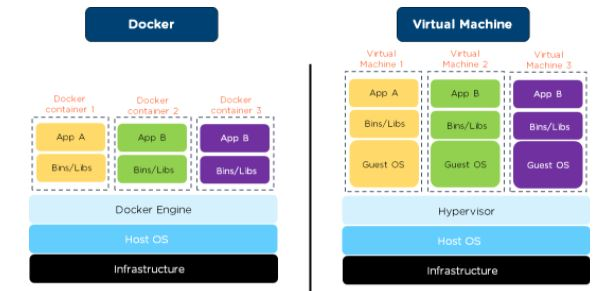
- Difference between Virtual Machine and Docker
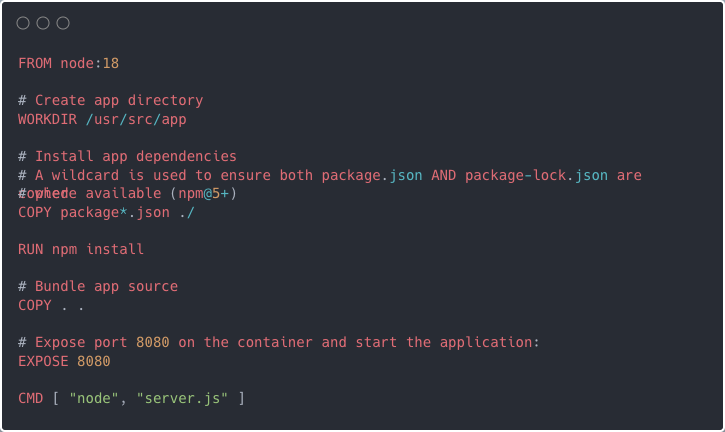
- Build a docker image
- Disadvantages of Docker ?
- No Auto recovery
- No GUI
- Overload
- Security
- Cross platform
- Scaling
What is Kubernetes ?
- Orchestration tool
- Developed by Google
- Helps manage containerised applications
- Terminology
- Not containers, Its 😮 PODS 😮
- Not deployments; Its 😮 WORKLOADS 😮
- Pods is collection of container; where container is just an docker instance
- Read about : Replicas - nothing but pods multiplied by number of specified replicas
Why Kubernetes ?
- Opensource and cross platform
- Can run in any cloud or on premises platform
- Scalable
- Autoscale at ease
- Service discovery
- Connect across services internally or externally
- Self Healing
- Auto recovery of workloads in case of disaster
- Versioning and roll back
- Workloads can rollback on failure
- RBAC
- Secure access to workloads
- Easy to migrate
- Deploy anywhere and anytime
- Zero downtime
- Seamless deployments
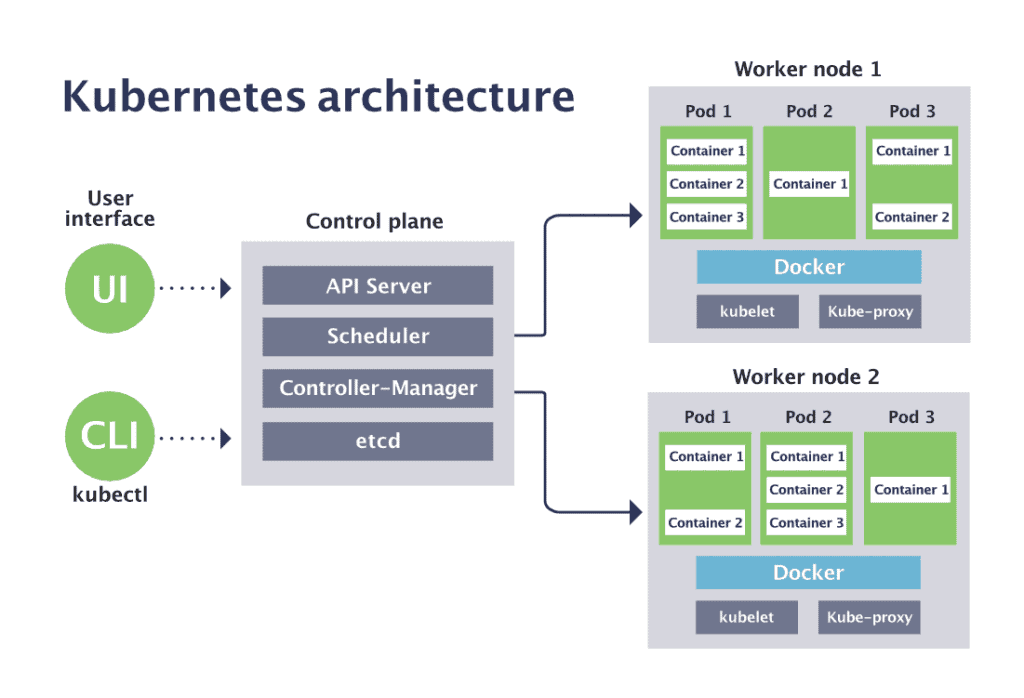
Kubernetes Architecture
Namespaces
- Concept in K8
- It is logical segregation of applications
- A mechanism to attach authorisation and policy to a sub section of a cluster
Types of workloads
Pods
Pods are the smallest deployable units of computing that you can create and manage in Kubernetes.
A Pod (as in a pod of whales or pea pod) is a group of one or more containers, with shared storage and network resources, and a specification for how to run the containers.
apiVersion: v1
kind: Pod
metadata:
name: nginx
spec:
containers:
  -name: nginx
image: nginx:1.14.2
ports:
    -containerPort: 80
Deployment
- A deployment provides declarative updated to pod
- Ex: Here is the command to K8 that I have this image; replicate this into 3 images
- Read about - Adding probes - nothing but health URLs
Statefulset
- StatefulSet is the workload API object used to manage stateful applications
- Manages the deployment and scaling of a set of Pods, and provides guarantees about the ordering and uniqueness of these Pods
- It is quite risky to use statefulset, beware before using it
Daemonset
- A DaemonSet ensures that all (or some) Nodes run a copy of a Pod. As nodes are added to the cluster, Pods are added to them. As nodes are removed from the cluster, those Pods are garbage collected. Deleting a DaemonSet will clean up the Pods it created
- Ex: proxies in all work nodes
- Ex: logger in all work nodes
Job or Cron Job
- A job or cronjob defines tasks that run to completion and the stop. Jobs represent one-off tasks whereas Cronjob recur during to a schedule
Other important API components
- Services
- Secrets and Config Maps
- Persistent volumes and claims
K8s Services
- A Kubernetes Service is a mechanism to expose applications both internally and externally
- Kubernetes assigns Pods private IP addresses as soon as they are created in the cluster. However, there is a catch: These IP addresses are not permanent. If you delete or recreate a Pod, it gets a new IP address, different from the one it had before. This is problematic for a client that needs to connect to a Pod. If the IP address keeps changing, which one would the client keep track of and connect to?
- Imagine if you had a friend who kept changing their phone number every day. You wouldn't be able to call them or text them because you wouldn't know which number to use.
- This is where Kubernetes Services come in. A Service helps a client reach one (or more) of the Pods that can fulfil its request. The Service can be reached at the same place, at any point in time. So it serves as a stable destination that the client can use to get access to what it needs. The client doesn’t have to worry about the Pods’ dynamic IP addresses anymore.
- Communication between k8s can be done using service name which is specified in manifest yaml file
Now that we understand the basic purpose of a Kubernetes Service, let's take a closer look at how different types of Services work and what they're used for.
Creating a service
- Every service has a selector that filters that will link it with a set of Pods in your cluster.
- For example, suppose you have a set of Pods that each listen on TCP port 9376 and are labelled as
app.kubernetes.io/name=MyApp. You can define a Service to publish that TCP listener
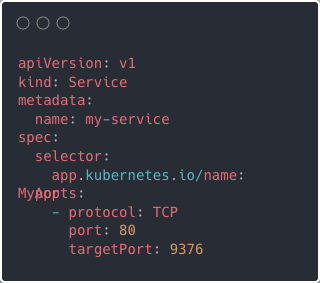
Applying this manifest creates a new Service named "my-service", which targets TCP port 9376 on any Pod with the app.kubernetes.io/name: MyApp label.
Types of Services in K8s
- ClusterIP
- NodePort
- LoadBalancer
ClusterIP
- In Kubernetes, the ClusterIP Service is used for Pod-to-Pod communication within the same cluster. This means that a client running outside of the cluster, such as a user accessing an application over the internet, cannot directly access a ClusterIP Service.
- When a ClusterIP Service is created, it is assigned a static IP address. This address remains the same for the lifetime of the Service. When a client sends a request to the IP address, the request is automatically routed to one of the Pods behind the Service. If multiple Pods are associated, the ClusterIP Service uses load balancing to distribute traffic equally among them
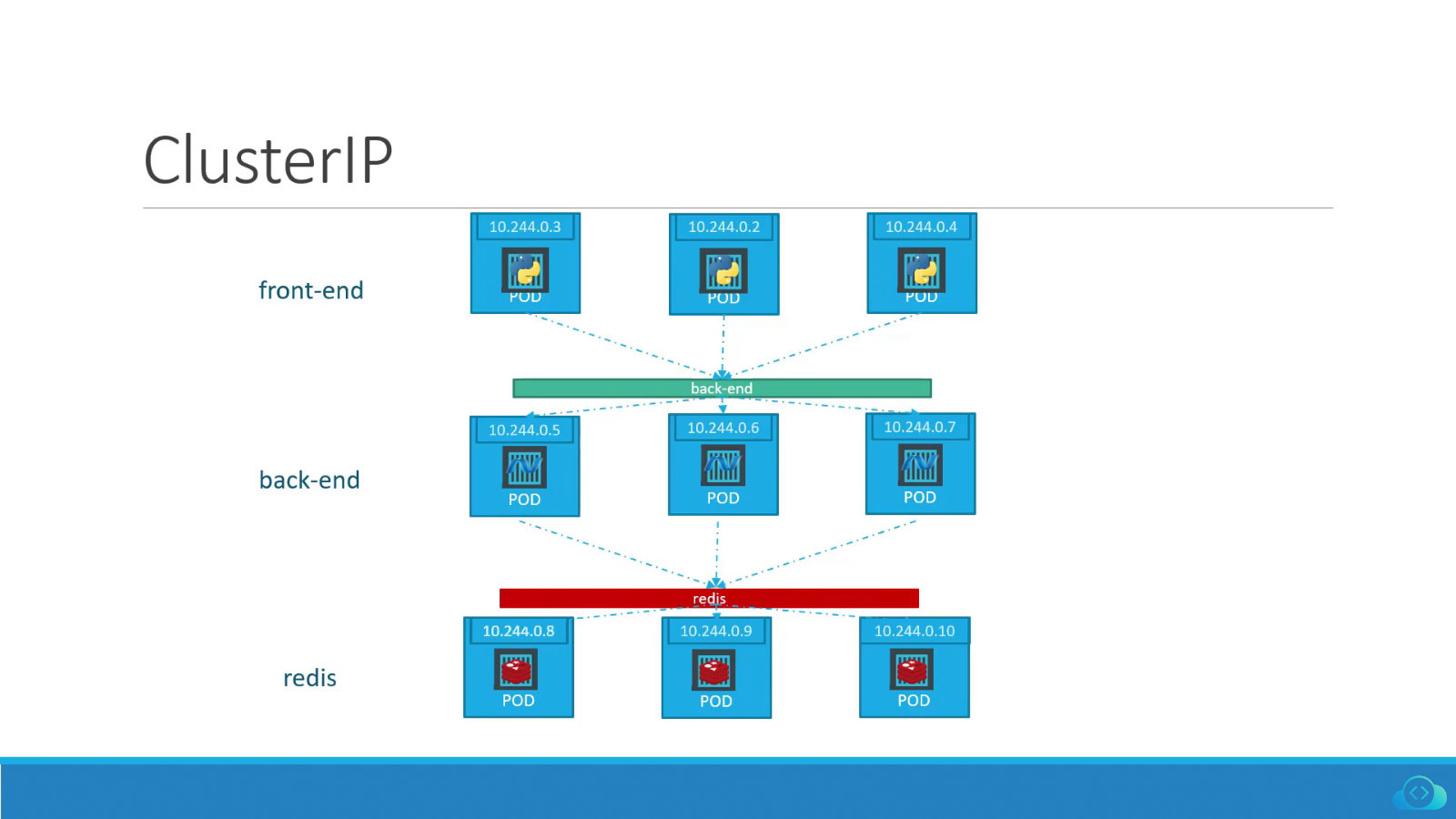
- In the image above, the green bar titled "back-end" represents a ClusterIP Service. It sits in front of all the Pods labeled "back-end" and redirects incoming traffic to one of them.
Now you know what a Kubernetes ClusterIP Service is and how it works. Next, let's dive into NodePort Service
NodePort
- The NodePort Service is a way to expose your application to external clients. An external client is anyone who is trying to access your application from outside of the Kubernetes cluster.
- The NodePort Service does this by opening the port you choose (in the range of 30000 to 32767) on all worker nodes in the cluster. This port is what external clients will use to connect to your app. So, if the nodePort is set to 30020, for example, anyone who wants to use your app can just connect to any worker node’s IP address, on port :30020, and voila! They're in.
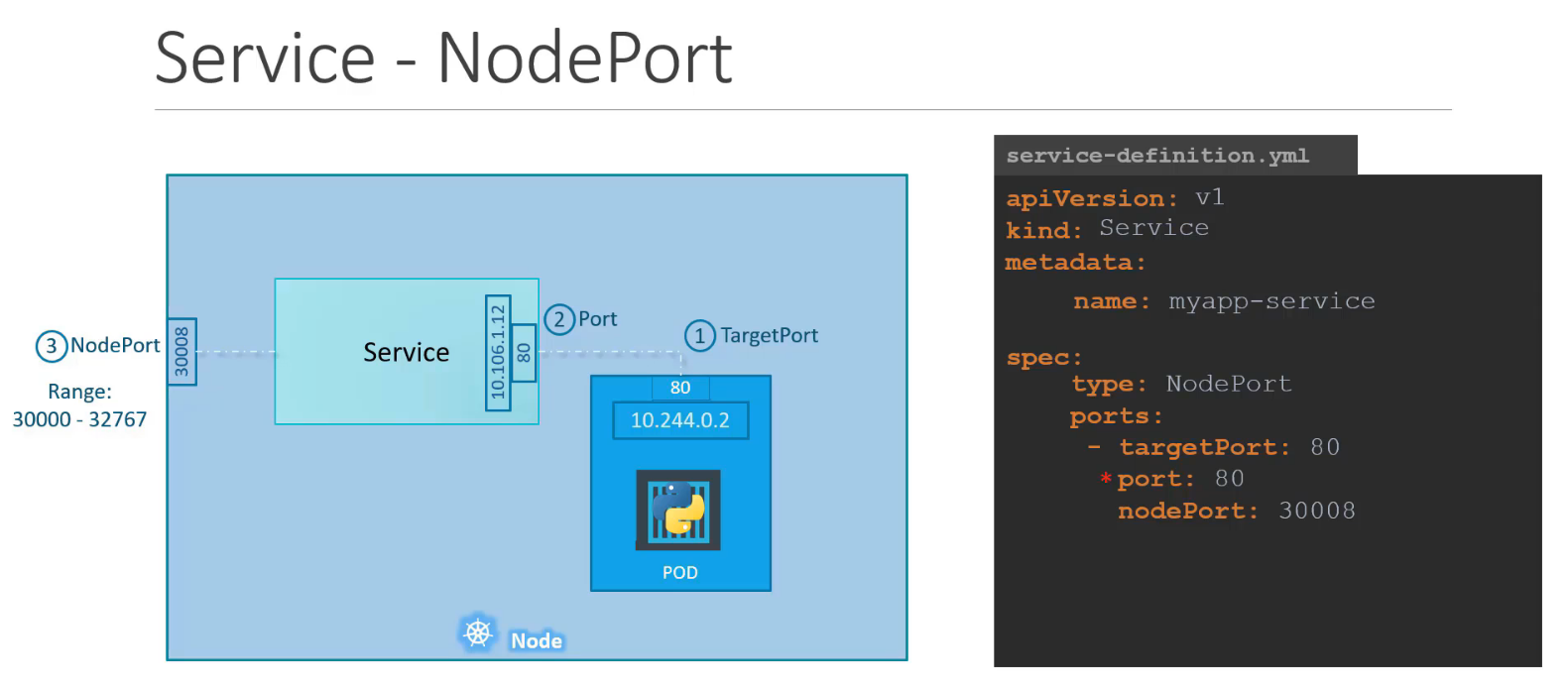
- Note that a NodePort Service builds on top of the ClusterIP Service type. What this means is that when you create a NodePort Service, Kubernetes automatically creates a ClusterIP Service for it as well. The node receives the request, the NodePort Service picks it up, it sends it to the ClusterIP Service, and this, in turn, sends it to one of the Pods behind it (External Client->Node->NodePort->ClusterIP->Pod). And the extra benefits are that internal clients can still access those Pods, and quicker. They can just skip going through the NodePort and reach the ClusterIP directly to connect to one of the Pods.
- One disadvantage of the NodePort Service is that it doesn't do any kind of load balancing across multiple nodes. It simply directs traffic to whichever node the client connected to. This can create a problem: Some nodes can get overwhelmed with requests while others sit idle.
Now that you have a good understanding of the NodePort Service, it’s time to examine the LoadBalancer Service.
LoadBalancer
- A LoadBalancer Service is another way you can expose your applications to external clients. However, it only works if you're using Kubernetes on a cloud platform that supports this Service type.
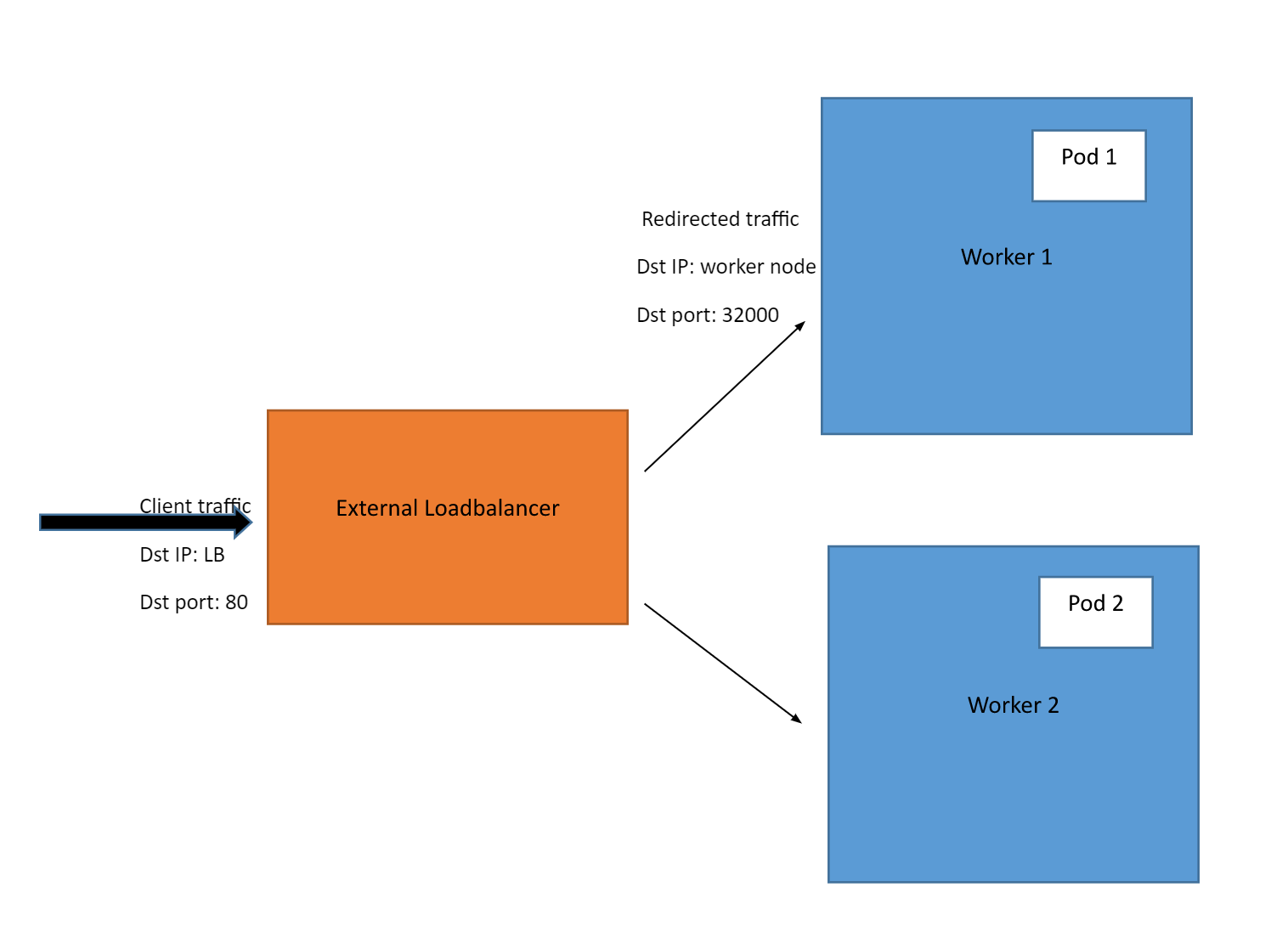
- Now, when you create a LoadBalancer Service, Kubernetes detects which cloud computing platform your cluster is running on and creates a load balancer in the infrastructure of the cloud provider. The load balancer will have its own unique, publicly accessible IP address that clients can use to connect to your application.
- For example, if you're running a Kubernetes cluster on a cloud platform like Amazon Web Services (AWS), you can create a LoadBalancer Service. When you do this, Kubernetes will create an Elastic Load Balancer in AWS to route traffic to the nodes in your cluster.
Note that the LoadBalancer Service this time builds on top of the NodePort Service, with an added benefit: It adds load balancing functionality to distribute traffic between nodes. This reduces the negative effects of any one node failing or becoming overloaded with requests.
The traffic coming from external clients goes through a path like this: External client -> Loadbalancer -> Worker node IP -> NodePort -> ClusterIP Service -> Pod
ClusterIP vs NodePort vs LoadBalancer: Key Differences & Use Cases
Key difference
| ClusterIP | NodePort | LoadBalancer | |
|---|---|---|---|
| Communication | Pod-to-Pod | External client-to-Pod (No load balancing between nodes) | External client-to-Pod (Load balancing between nodes) |
| Cloud platform required? | No | No | Yes |
Use cases
| ClusterIP | NodePort | LoadBalancer | |
|---|---|---|---|
| Use case | To allow Pod-to-Pod communication within the same cluster | To expose app(s) inside the cluster to external clients (outside the cluster). Client requests go to the same node they connected to. | To expose app(s) inside the cluster to external clients (outside the cluster). Client requests are load balanced across multiple nodes. |
The choice of which Kubernetes Service type to use depends on the specific requirements of your application and the environment where it is running. Having said that, here is a brief overview of when to use which Service type:
ClusterIP:
- Use this Service type when you want to expose an application within the cluster and allow other Pods within the cluster to access it.
NodePort:
- Use this Service type when you want to expose your application on a specific port on each worker node in the cluster, making it accessible to external connections (coming from outside the cluster). NodePort Services are often used for development and testing purposes.
LoadBalancer:
- Use this Service type when you want to expose your application to external clients. Sounds like the same thing mentioned for NodePort. But, there's the added benefit. You take advantage of a cloud provider's load balancing capabilities. And all client requests can be smoothly load balanced to multiple nodes in your cluster.
- LoadBalancer Services are typically used in production environments. Why? One big reason is the increased reliability. When clients connect to one node specifically (through NodePort), if that node fails, the clients will be left hanging. Their requests will remain unfulfilled as the node is unreachable.
But, with a LoadBalancer, if one node fails, the LoadBalancer doesn't rely on a single node (it sends traffic to all). So only a few requests hitting the problematic node will fail, not all.
How to Use and Start Kubernetes ?
Prerequisites
- minikube is local Kubernetes, focusing on making it easy to learn and develop for Kubernetes.
- Docker image / project
Steps / Workflow
- Build docker image
- Load docker image to minikube
- Verify minikube image
- Apply kubctl service yaml configuration for k8s
kubectl apply -f echo.yaml
- Verify logs in in kubctl
- Pre-checks
minikube ip- Get IP for HTTP requestsuser@ubuntu$: mininkube ip 192.168.49.2
kubctl get pods- Get pods infoNAME READY STATUS RESTARTS AGE echoapi-deployment-5d77cc94bf-5k8xd 1/1 Running 0 11m
kubctl get servicesNAME TYPE CLUSTER-IP EXTERNAL-IP PORT(S) AGE echoservice NodePort 10.101.27.233 <none> 9595:31122/TCP 11m kubernetes ClusterIP 10.96.0.1 <none> 443/TCP 33m
- In services kubctl under port - copy right hand side port number
- In the above example output, echo service can be accessed by using port 31122
- Test the service with cURL command
- cURL command for testing Node echo service
user@devops:devops_training/apigw-opa-trial/services$ curl http://192.168.49.2:31122/echo/MESSAGE_RECEIVED_HERE/after/2000
MESSAGE_RECEIVED_HERE
Replication
- A ReplicaSet's purpose is to maintain a stable set of replica Pods running at any given time. As such, it is often used to guarantee the availability of a specified number of identical Pods.
- Update manifest config.yaml of k8s
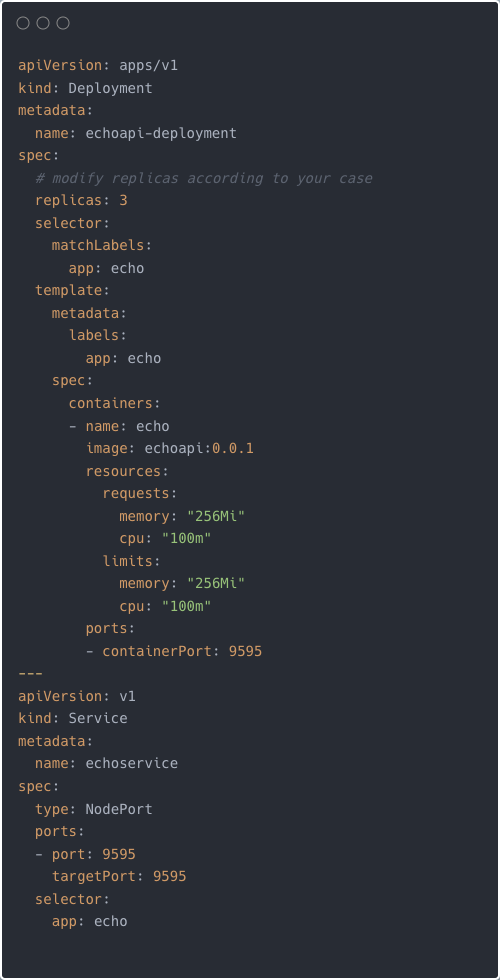
- Apply manifest
kubectl apply -f echo.yaml
- Get the current ReplicaSets deployed:
kubectl get rs
NAME         DESIRED   CURRENT   READY     AGE
echoservice     3         3         3       6s
- Check state of ReplicaSet
kubectl describe rs/echoservice
- Example of initiating docker build and load into k8s
user@devops:~/devops_training/node/src/EchoAPI$ minikube status
minikube
type: Control Plane
host: Running
kubelet: Running
apiserver: Running
kubeconfig: Configured

user@devops:~/devops_training/node/src/EchoAPI$ docker build -t echoapi:0.0.1 .
[+] Building 1.0s (12/12) FINISHED
 => [internal] load build definition from Dockerfile                                                                                      0.0s
 => => transferring dockerfile: 196B                                                                                                      0.0s
 => [internal] load .dockerignore                                                                                                         0.0s
 => => transferring context: 2B                                                                                                           0.0s
 => [internal] load metadata for docker.io/library/node:12.16.3-slim                                                                      0.8s
 => [internal] load metadata for docker.io/library/node:12.16.3                                                                           0.8s
 => [builder 1/4] FROM docker.io/library/node:12.16.3@sha256:b51dc2876a5d1e184190d76a2a1f11da034d16acd95ab2e0c2191b8f1ab65d4c             0.0s
 => [stage-1 1/2] FROM docker.io/library/node:12.16.3-slim@sha256:03d1fd98a9b4fc95133eee2d47d2b77cf89d51312eb1a8eeec36757568c1ec9e        0.0s
 => [internal] load build context                                                                                                         0.0s
 => => transferring context: 90B                                                                                                          0.0s
 => CACHED [builder 2/4] WORKDIR /app                                                                                                     0.0s
 => CACHED [builder 3/4] COPY . /app                                                                                                      0.0s
 => CACHED [builder 4/4] RUN npm install                                                                                                  0.0s
 => CACHED [stage-1 2/2] COPY --from=builder /app .                                                                                       0.0s
 => exporting to image                                                                                                                    0.0s
 => => exporting layers                                                                                                                   0.0s
 => => writing image sha256:42e52fc6702187c8fcf55ba86ac3dc61366c4737a4335355c7abc308c7914297                                              0.0s
 => => naming to docker.io/library/echoapi:0.0.1                                                                                          0.0s
user@devops:~/devops_training/node/src/EchoAPI$ minikube image ls
k8s.gcr.io/pause:3.5
k8s.gcr.io/kube-scheduler:v1.22.0
k8s.gcr.io/kube-proxy:v1.22.0
k8s.gcr.io/kube-controller-manager:v1.22.0
k8s.gcr.io/kube-apiserver:v1.22.0
k8s.gcr.io/etcd:3.5.0-0
k8s.gcr.io/coredns/coredns:v1.8.4
gcr.io/k8s-minikube/storage-provisioner:v5
docker.io/library/echoapi:0.0.1
user@devops:~/devops_training/node/src/EchoAPI$ minikube image load echoapi:0.0.1
user@devops:~/devops_training/node/src/EchoAPI$ kubectl apply -f ../../services/echo.yaml
deployment.apps/echoapi-deployment unchanged
service/echoservice unchanged
user@devops:~/devops_training/node/src/EchoAPI$ minikube ip
192.168.49.2
user@devops:~/devops_training/node/src/EchoAPI$ kubectl get pods
NAME                                  READY   STATUS    RESTARTS        AGE
echoapi-deployment-5d77cc94bf-5k8xd   1/1     Running   1 (9m20s ago)   4d23h
echoapi-deployment-5d77cc94bf-9tg4f   1/1     Running   1 (9m20s ago)   4d23h
echoapi-deployment-5d77cc94bf-w9br5   1/1     Running   1 (9m20s ago)   4d23h
user@devops:~/devops_training/node/src/EchoAPI$ kubectl get services
NAME          TYPE        CLUSTER-IP      EXTERNAL-IP   PORT(S)          AGE
echoservice   NodePort    10.101.27.233   <none>        9595:31122/TCP   4d23h
kubernetes    ClusterIP   10.96.0.1       <none>        443/TCP          5d
user@devops:~/devops_training/node/src/EchoAPI$ curl http://192.168.49.2:31122/echo/hi/after/2000
hi
user@devops:~/devops_training/node/src/EchoAPI$ kubectl get rs
NAME                            DESIRED   CURRENT   READY   AGE
echoapi-deployment-5d77cc94bf   3         3         3       4d23h
user@devops:~/devops_training/node/src/EchoAPI$ kubectl describe rs/echoapi-deployment-5d77cc94bf
Name:           echoapi-deployment-5d77cc94bf
Namespace:      default
Selector:       app=echo,pod-template-hash=5d77cc94bf
Labels:         app=echo
                pod-template-hash=5d77cc94bf
Annotations:    deployment.kubernetes.io/desired-replicas: 3
                deployment.kubernetes.io/max-replicas: 4
                deployment.kubernetes.io/revision: 1
Controlled By:  Deployment/echoapi-deployment
Replicas:       3 current / 3 desired
Pods Status:    3 Running / 0 Waiting / 0 Succeeded / 0 Failed
Pod Template:
  Labels:  app=echo
           pod-template-hash=5d77cc94bf
  Containers:
   echo:
    Image:      echoapi:0.0.1
    Port:       9595/TCP
    Host Port:  0/TCP
    Limits:
      cpu:     100m
      memory:  256Mi
    Requests:
      cpu:        100m
      memory:     256Mi
    Environment:  <none>
    Mounts:       <none>
  Volumes:        <none>
Events:           <none>
user@devops:~/devops_training/node/src/EchoAPI$- Representation on how k8s with above manifest and replication arranged

🤔 Things to keep in mind
- How to mount a folder or file in a folder in Docker ?
- Ex: Copy postgres configuration file from
/usr/opt/postgresduring Docker creation
- Ex: During nginx setup
FROM nginxCOPY ./index.html /usr/share/nginx/htmlCopy custom index.html to nginx folder post docker install nginx
- Ex: Copy postgres configuration file from
- Read about
- Probes
- Liveness
- Readiness
- Life cycle, Hooks and Prehooks
- Service mesh and side car
- Probes
Suggested Reading