Ansible

- Once we have infra setup by Terraform
- We use Ansible to manage services inside VMs
- Steps mentioned will be OS dependent
- Ansible Playbooks are lists of tasks that automatically execute against hosts. Groups of hosts form your Ansible inventory. Each module within an Ansible Playbook performs a specific task. Each module contains metadata that determines when and where a task is executed, as well as which user executes it
- It also supports extras like core modules and custom modules
Ansible Architecture
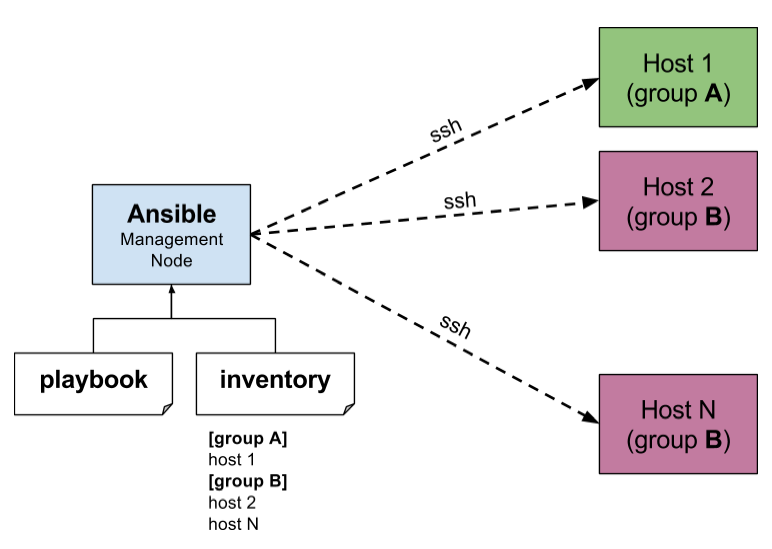
Sample installation and usage
- Entry file for Ansible execution is
- ansible/tree/main/-/postgres/postgres.yaml/
- Installing PostgreSQL - Refer devops-training repository
- Folders
- Define versions
- ansible/tree/main/-/postgres/roles/postgres-install/defaults/main.yaml/
- Configuration of Postgres and other artificats
- ansible/tree/main/-/postgres/roles/postgres-install/files/
- List of steps to be followed by Ansible for this task
- ansible/tree/main/-/postgres/roles/postgres-install/tasks/main.yaml/
- Templates folder
- Remains same
- Additional changes for directory or ip address can be updated here
- hosts file
- IP address and user who is going to execute this task in VM
- If you mention webservers address; ansible playbook will execute all the tasks in the specified web addresses
Example Playbooks Directory
This covers the details of the default/recommended directory layout from the Ansible documentation. Link: https://docs.ansible.com/ansible/latest/user_guide/playbooks_best_practices.html#directory-layout
Here is the example directory layout for an Ansible playbooks/ directory:
hosts                     # inventory file

group_vars/
   group1.yml             # here we assign variables to particular groups
   group2.yml
host_vars/
   hostname1.yml          # here we assign variables to particular systems
   hostname2.yml

library/                  # if any custom modules, put them here (optional)
module_utils/             # if any custom module_utils to support modules, put them here (optional)
filter_plugins/           # if any custom filter plugins, put them here (optional)

site.yml                  # master playbook
webservers.yml            # playbook for webservers role
dbservers.yml             # playbook for dbservers role
fooapp.yml                # playbook for foo app

roles/
    common/               # this hierarchy represents defaults for a "role"
        tasks/            #
            main.yml      #  <-- tasks file can include smaller files if warranted
        handlers/         #
            main.yml      #  <-- handlers file
        templates/        #  <-- files for use with the template resource
            ntp.conf.j2   #  <------- templates end in .j2
        files/            #
            bar.txt       #  <-- files for use with the copy resource
            foo.sh        #  <-- script files for use with the script resource
        vars/             #
            main.yml      #  <-- variables associated with this role
        defaults/         #
            main.yml      #  <-- default lower priority variables for this role
        meta/             #
            main.yml      #  <-- role dependencies
        library/          # roles can also include custom modules
        module_utils/     # roles can also include custom module_utils
        lookup_plugins/   # or other types of plugins, like lookup in this case

    webservers/           # same kind of structure as "common" was above, done for the webservers role
    dbservers/            # ""
    fooapp/               # ""
Further reading on -
Ansible/Directory Layout/Details - charlesreid1
🤔 Things to keep in mind
- Immutable Infra
- Immutable infrastructure is an approach to managing services and software deployments on IT resources wherein components are replaced rather than changed. An application or service is effectively redeployed each time any change occurs
- Ex: Containers are a good example of immutable infrastructure because persistent changes to containers can only be made by creating a new version of the container or recreating the existing container from its image
- Idempotent Infra
- You should be able to run the same playbook N number of times on the infra